Headings
The heading() function can produce headings or large size text of various sizes that can be used as the title of a web page just as the “Headings” word at the top is the title for this page.This function generates the heading tags h1,h2,h3,h4,h5,h6 in Html(more info)
Formal Python definition
- heading(text, num=1, text_type='', style={}, id='', class_name='', attr_list=[])
Gernerates headings of various sizes
- Parameters:
text (str) – Required parameter of the text to be put as headings
num (int or None) – Optional parameter of number deciding the heading size from biggest 1(for h1 tag) to 6(h6) for smallest,defaults to 1 or biggest heading
text_type (str or None) – Optional parameter of what processing to apply to text such as bold,italics
style (dict(str) or None) – Optional parameter of style dictionary containing all styles to be applied to headings in the form of key value pairs
id (list(str])) – Optional parameter for the id to be assigned to heading for applying styling or manipulating via javascript.It can be any randomly chosen string, but it should be unique to the element or only id in a page. Accessed using # operator
class_name – Optional parameter for the class to be assigned to heading for applying styling or manipulating via javascript.It can be any randomly chosen string, and multiple html elements of different types can have same class names.Accessed using . operator
attr_list – Other than id or class, any other attribute can be applied to element by specifying as quoted strings separated by commas within a list. eg [‘disabled’] for disabling a button
- Returns:
None
- Return type:
None
Informal simple English defimition and Explanation
Mandatory arguments are given in bold and rest are optional arguments which may be ommitted
heading(text,num=1,text_type=””,style={})
This function requires a ‘text’ parameter in the form of a string of text to be passed to it, which will appear as large size text or heading like text, on the webpage.
The next optional argument of “num” determines what sized heading you want.This integer argument can be anything from 1 to 6, with the integer 1 resulting in the biggest size heading and the integer 6 giving the smallest possible heading.For those familiar with html , this is how you can use the differnet heading tags of h1 to h6.The default is 1, so if no argument is passed for ‘num’ parameter, then it would result in the biggest size heading or equivalent h1 tag in html
The third optional argument of text_type decides what sort of transforamtion such as bold or italics has to apllied to the heading text displayed on the webpage.The following table gives the different strings that can be passed as text_type argument followed by a brief explanation of what it does. the html explanation can be found here
Argument strings |
Function |
|---|---|
bold |
Makes the text bold |
italics |
makes the text italics |
important |
Important text(equivalent of strong in html) |
emphasized |
Emphasized text |
mark |
Marked text |
small |
Smaller text |
deleted |
Deleted text |
inserted |
Inserted text |
sub |
Subscript text |
sup |
Superscript text |
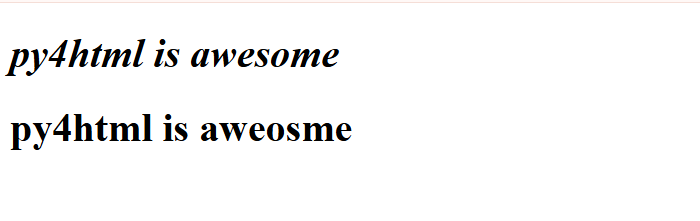
As an example,this is how the two different headings would look
from py4htmlpc import *

heading("py4html is awesome",text_type="italics") #no argument for num and hence it defaults to 1 or biggest size
heading("py4html is aweosme")
A very important point while passing arguments to py4html functions
One very important point to note here, as well as while using all functions in py4html is that the order of arguments matters the most. In the first case, becuase we are omiting the num argument, it is mandatory to pass the text_type argument as text_type =”italics” itself and simply passing “italics” will not produce any errors in your IDE, but it will lead to undesirable, wierd and wrong results.The first argument is the text to be put in heading which cannot be avoided and so you need not pass it as “text=” and instead can just pass the string of text as the first argument,but for all other arguments unless you pass all arguments in the exact order as given in function definition, you will need to pass each argument by calling their formal parameter names such as num=1 text_type=”bold” and so on
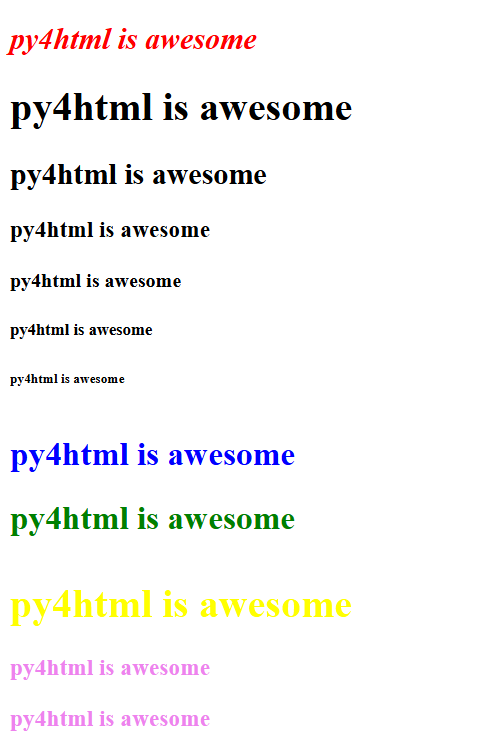
Italics was chosen for the above example as you wont’t notice any difference between bold and non-bold text when it comes to headings. For headings, it seems that the only useful and commonly used transforamtion that you can apply is “italics”,everything else doesn’t result in any difference.To apply the style, we will be passingcss property names and their corresponding values as key value pairs in a dictionary.There are many properties associated with each tag in html,for changing colors, there is “background-color” property which changes the color of entire body which can be the entire body of a web page or divisions.For changing color of text,thereis “color” property and sometimes for some tags, “font-color” property.For headings set of html tags or for the equivalent heading function in py4html,the color of the text can be changed by changing the “color” property to the color of your choice.So the style dictionary just for changing color becomes like style={“color”:”blue”} and so on. The code fragment shown below shows some examples of using the heading in various ways and the output produced id shown in the image below that.Note that in the first case, as we are passing all arguments to heading function in the exact order it was defined, there is no need to pass arguments by calling thier names.But when we mess up that order, we have to call their indvidual names like num=1,text_type=’bold’,style={“color”:”yellow”} and so on
from py4html import *
heading("py4html is awesome",2,"italics",{"color":"red"})
heading("py4html is awesome",num=1)
heading("py4html is awesome",2)
heading("py4html is awesome",3)
heading("py4html is awesome",4)
heading("py4html is awesome",5)
heading("py4html is awesome",6)
heading("py4html is awesome",text_type="sub",style={"color":"blue"})
heading("py4html is awesome",text_type="sup",style={"color":"green"})
heading("py4html is awesome",style={"color":"yellow"})
heading("py4html is awesome",3,style={"color":"violet"})
#same result as previous
heading("py4html is awesome",num=3,style={"color":"violet"})
Alternative more simpler way of creating headings
There are also alternative heading functions available in py4html that acheives the same result, but their names are more intuitive about their use such as biggest_heading() for the higest possible sized heading text, smallest_heading() for the smallest possible heading text size, bigger_heading() for the one smaller than biggest, smaller_heading() for the second smallest and so on. So while using these intuitively named functions, there is no need to pass the “num” argument for deciding the size of the heading text. Every other argument is exactly the same as heading() function defined above in the exact same order.The different available functions along with the value of the num argument that it is used as a replacement for, and the equivalent heading tags in html are given in the table below.
Function name |
num= |
html tag |
|---|---|---|
biggest_heading() |
1 |
h1 |
bigger_heading() |
2 |
h2 |
big_heading() |
3 |
h3 |
small_heading() |
4 |
h4 |
smaller_heading() |
5 |
h5 |
smallest_heading() |
6 |
h6 |
So if you need to use the smallest heading, you can call directly smallest_heading() function instead of calling heading() and passing num=6 to it
Formal python definitions of all alternative functions
- biggest_heading(text, text_type='', style={})
Generates the biggest possible heading (equivalent to h1 in HTML).
- Parameters:
text (str) – Required parameter of the text to be put as headings.
text_type (str or None) – Optional parameter for text formatting, such as bold or italics.
style (dict(str) or None) – Optional dictionary for additional CSS styling.
- Returns:
None
- Return type:
None
- bigger_heading(text, text_type='', style={})
Generates a heading of the second-largest size (equivalent to h2 in HTML).
- Parameters:
text (str) – Required parameter of the text to be put as headings.
text_type (str or None) – Optional parameter for text formatting, such as bold or italics.
style (dict(str) or None) – Optional dictionary for additional CSS styling.
- Returns:
None
- Return type:
None
- big_heading(text, text_type='', style={})
Generates a heading of the third-largest size (equivalent to h3 in HTML).
- Parameters:
text (str) – Required parameter of the text to be put as headings.
text_type (str or None) – Optional parameter for text formatting, such as bold or italics.
style (dict(str) or None) – Optional dictionary for additional CSS styling.
- Returns:
None
- Return type:
None
- small_heading(text, text_type='', style={})
Generates a heading of the third-smallest size (equivalent to h4 in HTML).
- Parameters:
text (str) – Required parameter of the text to be put as headings.
text_type (str or None) – Optional parameter for text formatting, such as bold or italics.
style (dict(str) or None) – Optional dictionary for additional CSS styling.
- Returns:
None
- Return type:
None
- smaller_heading(text, text_type='', style={})
Generates a heading of the second-smallest size (equivalent to h5 in HTML).
- Parameters:
text (str) – Required parameter of the text to be put as headings.
text_type (str or None) – Optional parameter for text formatting, such as bold or italics.
style (dict(str) or None) – Optional dictionary for additional CSS styling.
- Returns:
None
- Return type:
None
- smallest_heading(text, text_type='', style={})
Generates the smallest possible heading (equivalent to h6 in HTML).
- Parameters:
text (str) – Required parameter of the text to be put as headings.
text_type (str or None) – Optional parameter for text formatting, such as bold or italics.
style (dict(str) or None) – Optional dictionary for additional CSS styling.
- Returns:
None
- Return type:
None
The following examples will help you in understanding more about this alternative way of implementing headings
Examples of alternative heading functions
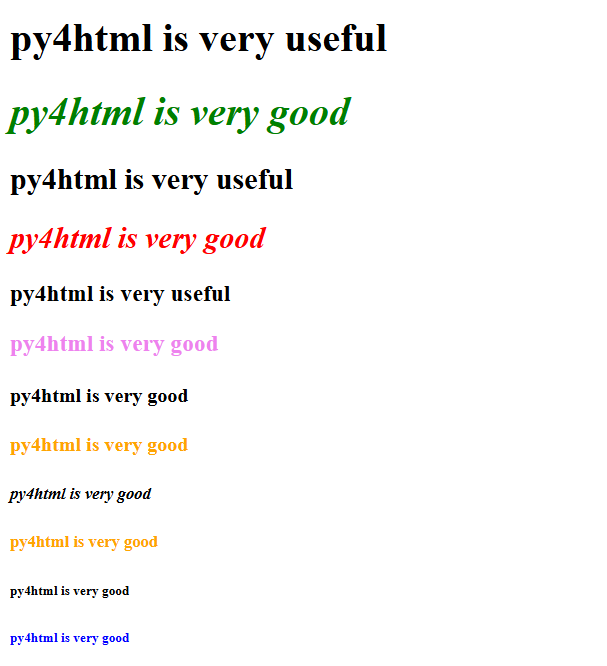
biggest_heading("py4html is very useful")
biggest_heading("py4html is very good",text_type="italics",style={"color":"green"})
bigger_heading("py4html is very useful")
bigger_heading("py4html is very good",text_type="italics",style={"color":"red"})
big_heading("py4html is very useful")
big_heading("py4html is very good",style={"color":"violet"})
small_heading("py4html is very good")
small_heading("py4html is very good",style={"color":"orange"})
smaller_heading("py4html is very good",text_type="italics")
smaller_heading("py4html is very good",style={"color":"orange"})
smallest_heading("py4html is very good")
smallest_heading("py4html is very good",style={"color":"blue"})